DITO SIM Registration 2026 | Philippines SIM Card Registration
If your DITO SIM has stopped sending or receiving texts, or you just bought a new one, you need to complete DITO SIM registration before you can use calls, texts, or mobile data. This is required under Republic Act No. 11934, the SIM Registration Act, and it applies to every prepaid and postpaid subscriber in the Philippines — including DITO, Globe, and Smart users.
This guide covers everything in one place: the official DITO SIM registration link, the registration form fields you’ll be asked to fill in, all three registration methods (app, web portal, and via text/SMS), requirements for minors, tourists, and businesses, how to check your registration status, common errors people run into, and answers to the questions Filipinos actually search for – including whether you can register using your DITO SIM registration number, how to buy regular load after registering, and whether GCash works with an unregistered SIM.
What Is DITO SIM Registration?
DITO SIM registration is the mandatory process of linking your DITO SIM card to your verified identity, your full name, date of birth, address, and a valid government ID, through DITO’s official registration system. It exists because of the SIM Registration Act (RA 11934), which was enacted to curb text scams, phishing, and other crimes committed using anonymous, unregistered SIM cards.
The law is implemented jointly by the National Telecommunications Commission (NTC) and the Department of Information and Communications Technology (DICT). Every SIM sold in the Philippines today — new or existing, prepaid or postpaid — is required to be registered before it can send texts, make calls, or use mobile data. An unregistered SIM will eventually be deactivated.
Government data has shown just how far behind SIM registration has lagged industry-wide, with tens of millions of SIMs still unregistered well past initial deadlines, which is why the DICT and NTC continue extending compliance periods and running public awareness campaigns through LGUs and Tech4ED Centers.
Who Needs to Register a DITO SIM?
Use this table to quickly find your category:
DITO SIM Registration Requirements
Who needs to register and what you’ll need to prepare
| User Type | Need to Register? | Notes |
|---|---|---|
| New DITO SIM buyer (prepaid) | Yes | SIM ships deactivated until registered |
| Existing DITO subscriber | Yes | Must confirm/re-submit identity info if not already done |
| Postpaid subscriber | Yes | Notified directly; must confirm submitted information |
| Minor (under 18) | Yes, under guardian | Requires guardian ID + consent |
| Business / corporate SIM | Yes | Needs SEC/DTI documents |
| Tourist | Yes | Passport + proof of local address + return ticket |
| Foreign national (non-tourist visa) | Yes | Passport + supporting immigration documents |
| eSIM user | Yes | Same rules apply as a physical DITO SIM |
You can register multiple DITO SIM cards under one name — there’s no limit stated by DITO on how many numbers one verified identity can cover, as long as each SIM registration is submitted individually.
Requirements Checklist for DITO SIM Registration
Basic Information You’ll Need
- Full legal name
- Date of birth
- Gender
- Present/official address
- A valid government-issued ID (photo/scan)
- Your DITO mobile number or SIM’s ICCID
Full List of Accepted Government IDs
Primary IDs |
Additional Accepted IDs |
|---|---|
|
Passport
PhilSys / National ID
SSS ID
GSIS e-Card
Driver’s License
NBI Clearance
Police Clearance
Firearms License to Own and Possess
PRC ID
IBP ID
OWWA ID
BIR ID
Voter’s ID
Senior Citizen Card
UMID
PWD Card
Student ID (state college/university, 18+)
|
PhilHealth ID
PhilPost ID
PNP ID
AFP ID
Municipality ID
Security Guard License (PNP)
Fisher Worker ID (BFAR)
LGU / Tupad ID (DOLE)
Retirement ID (PRA)
Barangay Tanod ID
Health Worker ID
Agricultural ID (DA)
Conductor ID (LTO)
Maritime ID (MARINA)
Navy ID
CAFGU ID
|
For Minors
For Businesses
For Tourists
For Foreign Nationals (Non-Tourist Visa)
Official DITO SIM Registration Link
Only register through DITO’s own channels. The DICT has repeatedly warned the public to avoid third-party sites claiming to offer a “free” registration shortcut or a paid registration service — there is no such thing as a DITO SIM registration number for free purchase; registration itself does not cost money on any official channel.
Official access points:
- DITO’s official SIM registration information page: dito.ph/sim-registration
- In-app registration inside the official DITO App (Google Play / Apple App Store — search “DITO”)
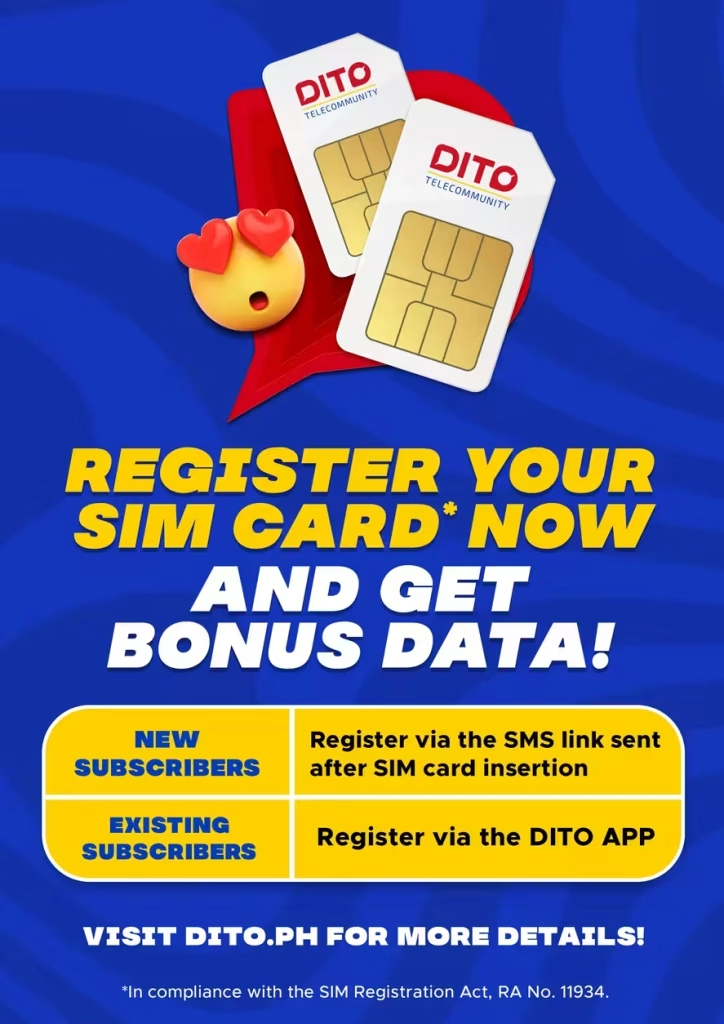
- The SMS registration link sent directly to your number after inserting a new SIM

How to Register Your DITO SIM (3 Methods)?
Ways to Register Your DITO SIM
Pick the method that works best for you
| Method | Best For | Speed |
|---|---|---|
| DITO App | Most users, smoothest experience | ~5–10 minutes |
| Official Website / Web Portal | Users without app storage | ~10 minutes |
| SMS Link | New SIMs, no app installed yet | ~5 minutes |
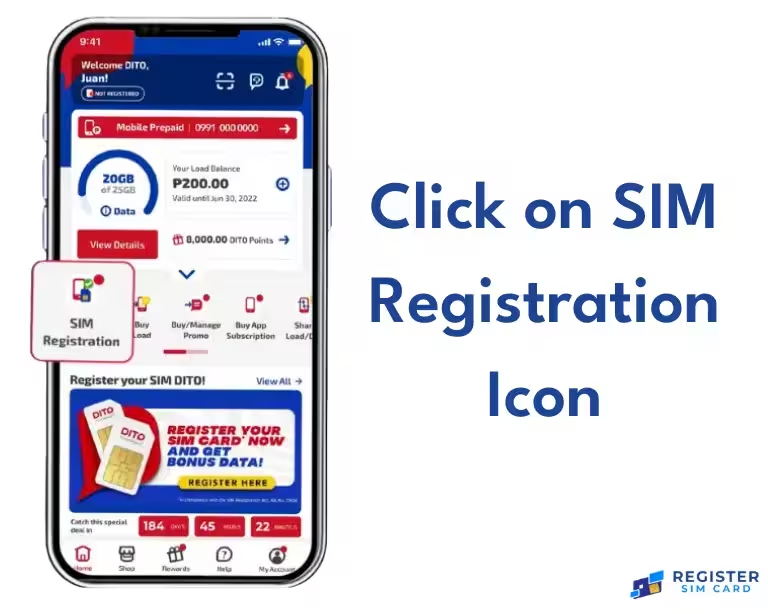
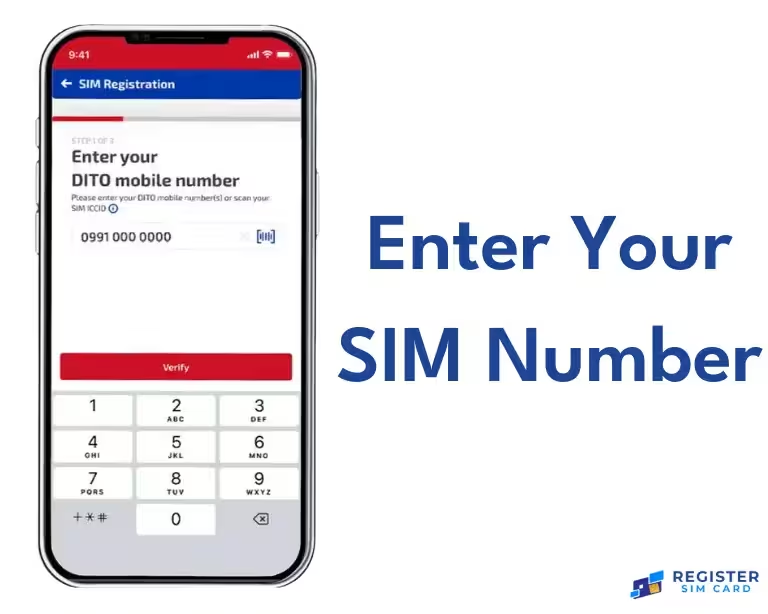
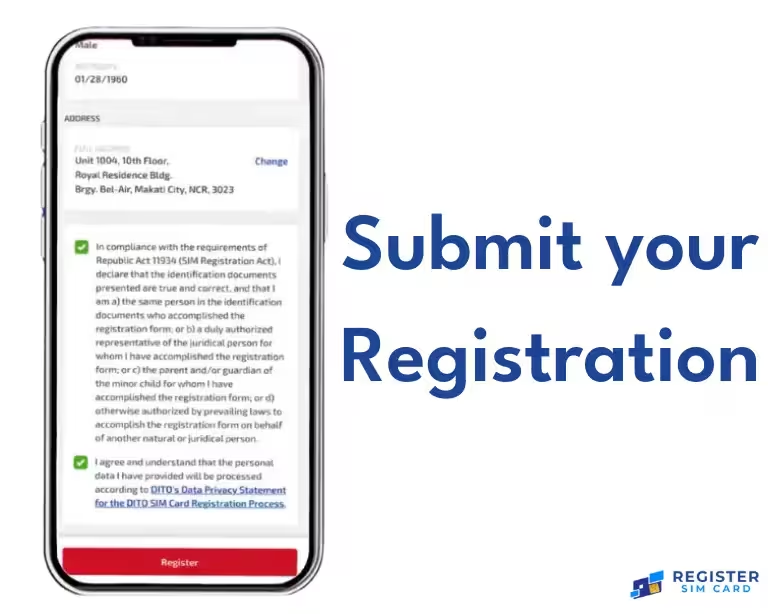
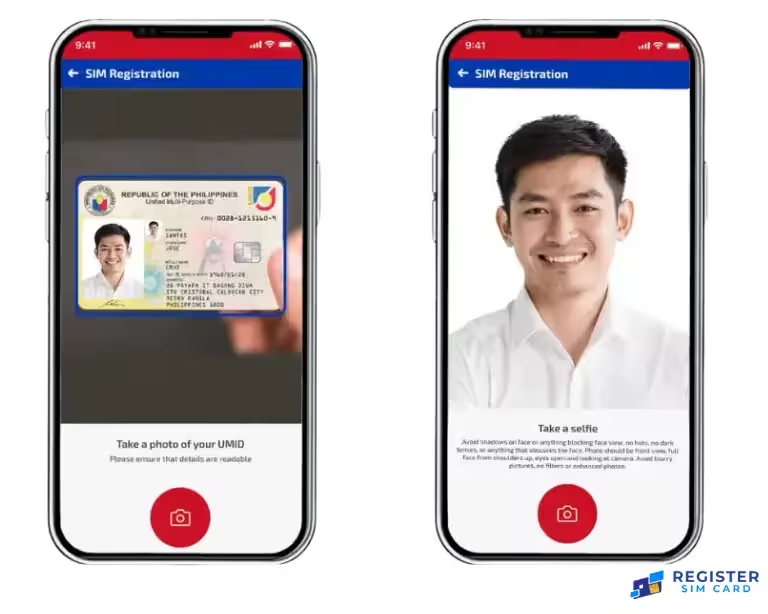
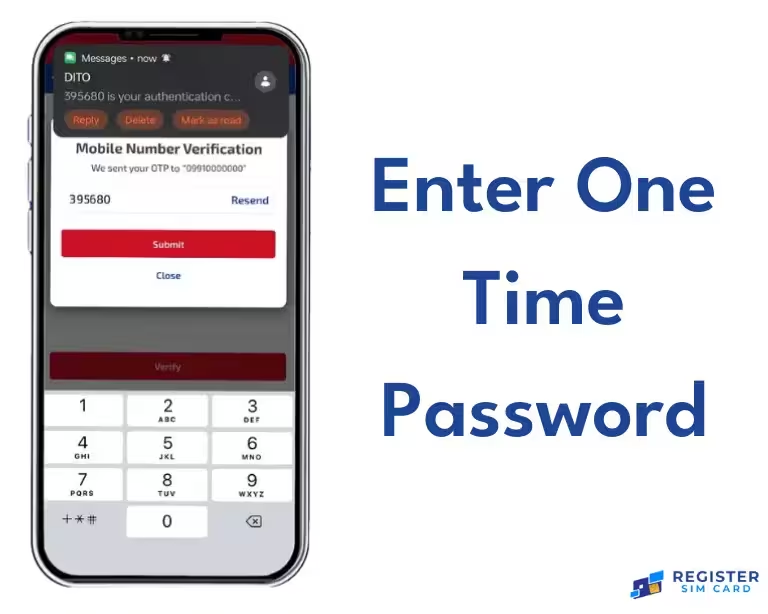
Method 1: DITO App Sim Registration (Recommended)
Method 2: SIM Card Registration Online via DITO Website
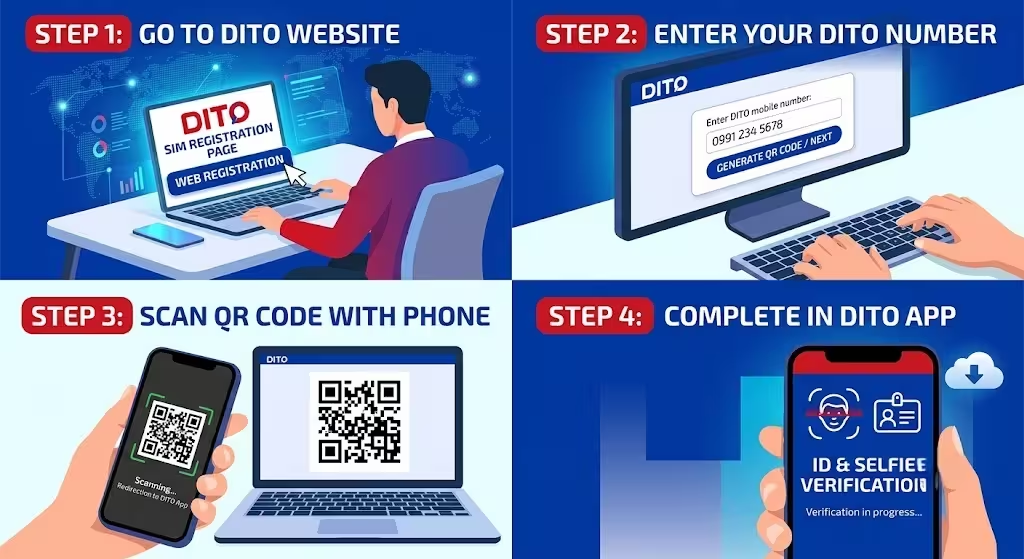
- Go to the official DITO SIM registration page and select the web registration option.
- Enter your DITO SIM registration number.
- A QR code may appear — scan it with your phone camera to be redirected into the DITO App for the final ID and selfie verification step.
- If you don’t yet have the app installed, you’ll be prompted to download it to finish.
Method 3: DITO SIM Registration via Text (SMS Link)
DITO New SIM Registration Guide
Follow these six simple steps to register your new DITO SIM and start using calls, texts, and data.
Insert and Activate
Insert your new DITO SIM into your phone and let it activate on the network.
Receive Registration Link
You’ll automatically receive an SMS containing your personal SIM registration link.
Tap Link and Enter Details
Tap the link and enter your full name, address, and valid ID number.
Verify Your Identity
Enter the OTP sent to your number to verify your identity.
Submit Your Registration
Tap Register to submit.
Save Proof
Save the confirmation SMS as proof of successful registration.
Registration Guide: Globe & Smart SIM Registration Online
DITO eSIM Registration
If you’re using a DITO e-SIM instead of a physical card, the registration process is identical — you’ll still submit your ID, personal details, and OTP through the DITO App. The only difference is there’s no physical card to insert; your eSIM profile is already provisioned digitally on your device.
Registering a Minor’s DITO SIM
Open the DITO App or official registration portal.
Select “Minor” or “Filipino Dependent” as the registrant type.
Enter the SIM’s mobile number and verify the OTP sent via SMS.
Upload a clear photo of the parent or legal guardian’s valid government ID.
Capture a live selfie of the minor or guardian, as prompted.
Fill in both the minor’s and the guardian’s personal information.
Review the registration summary carefully.
Tap Submit to complete.
Registering a Business / Corporate DITO SIM
Prepare your SEC or DTI Certificate of Registration.
Prepare a Board Resolution or Special Power of Attorney naming your authorized representative.
Select “Business Entity” as the registrant type in the DITO App or web portal.
Upload the company documents alongside the representative’s personal ID.
Complete OTP verification and submit.
Tourist & Foreign National DITO SIM Registration
Tourists need:
Foreign nationals on a non-tourist visa need:
Tourist SIM registrations are generally time-limited to match the visitor’s authorized stay in the country.
DITO SIM Registration: How Many Days Do You Have?
Under the SIM Registration Act, subscribers were originally given a 180-day window from the law’s implementation date to register existing SIMs, with the DICT authorized to extend that period by up to 120 additional days if needed. In practice, deadlines have already been extended more than once as registration compliance nationwide remained incomplete.
For new SIMs purchased today, registration is required before the SIM can be used at all — there’s effectively no grace period, since an unregistered new SIM is deactivated by default until you complete the process.
If you’re unsure whether a deadline currently applies to your specific number, check the DITO SIM registration page in the app or on dito.ph, since the DICT can revise timelines through NTC circulars.
What happens if you miss it:
How to Check Your DITO SIM Registration Number & Status?
There is no separate public “DITO SIM registration number check online” tool outside DITO’s own channels. To check your status:
Check your SIM registration status
Four ways to confirm where your registration stands
Open the DITO App and log in.
Go to your account or SIM settings section.
Look for Registration Status — it will show one of:
Alternatively, check via the official web portal, or call 185 using your DITO number for a live status check.
Troubleshooting Common DITO SIM Registration Issues
OTP Not Received
- Check your signal strength and mobile data/Wi-Fi connection
- Wait a few minutes, then request a new OTP
- Restart your device if the code still doesn’t arrive
ID Upload / Photo Errors
- Retake the photo in good lighting, avoiding glare and shadows
- Make sure all four corners of the ID are visible
- Compress the image to under 2MB if the upload keeps failing
“Invalid SIM Number” or ICCID Errors
- Double-check you’re entering the number exactly as printed on the SIM packaging
- Try scanning the ICCID barcode instead of typing it manually
Registration Stuck on “Pending”
- This is normal for the first few hours after submission during high-traffic periods
- If it’s been more than 24–48 hours, contact DITO support directly
App Crashes or Won’t Load Registration Page
- Update to the latest version of the DITO App
- Clear the app cache or reinstall
- Switch between mobile data and Wi-Fi to rule out a connectivity issue
Details Don’t Match ID
- Registration fails most often when the name or address entered doesn’t exactly match what’s printed on the uploaded ID — copy it exactly, including middle names and suffixes
Rewards After Registering Your DITO SIM
Can I Buy Load and Use GCash on an Unregistered DITO SIM?
You can generally still top up load on a DITO SIM before registration completes, since load balance and registration are technically separate systems — but full mobile services (calls, texts, and mobile data) will remain restricted until registration is approved. GCash works with DITO numbers, but since GCash relies on OTPs sent to your mobile number for verification, you’ll want your SIM active and registered to avoid disruptions receiving those codes.
DITO vs Globe vs Smart SIM Registration Matrix
⚠️ DICT Official Cybersecurity Mandate: Register exclusively through the validated telco domains verified below. Do not submit personal identification records or credentials to malicious third-party alternative domains (.net, .org, or clone links).
| Feature | DITO | Globe | Smart |
|---|---|---|---|
| Registration required | Yes | Yes | Yes |
| Registration methods | App, Website, SMS | App, Website, SMS | App, Website, SMS |
| Network | 4G / 5G | 2G / 3G / 4G / 5G | 2G / 3G / 4G / 5G |
| Coverage | Expanding nationwide | Nationwide | Nationwide |
| Official registration domain | dito.ph | globe.com.ph/simreg | smart.com.ph/simreg |
| Registration rewards | Bonus data, loyalty points | Varies by promo | Varies by promo |
Security Tips: Avoiding DITO SIM Registration Scams
Frequently Asked Questions about Dito Sim Registeration:

Conclusion
Completing your DITO SIM registration takes a few minutes if you have a valid ID and your personal details ready. Whether you register through the DITO App, the official website, or the SMS link sent to your number, the steps are the same: submit your information, verify your ID, confirm the OTP, and wait for approval. Doing it early protects you from sudden deactivation and keeps your calls, texts, mobile data, and services like GCash running without interruption.